Posts mit dem Label advanced werden angezeigt. Alle Posts anzeigen

Sonntag, 18. Oktober 2020

A new look for linuxintro.org

I have 20 years of experience with Linux in the job and wanted to give something back, so I founded linuxintro.org, a wiki where you can learn about Linux.

However, this wiki page quickly outdated: Mobile phones became the new standard for reading internet and I had to adapt Linuxintro to it. After some patching, a general overhaul was due. This is the topic here.

Old look-and-feel of linuxintro.org

New look-and-feel

The results are:
  • linuxintro looks good and has a professional "skin" as they call it. Works on mobile devices and on my huge screen at home.
  • linuxintro loads quicker. Almost 50x as fast.
  • no more code modifications in the mediawiki code

Performance

I wanted to see that linuxintro.org stays quick. To do this, I will use ab (apache benchmark). Measured from a server instance2 in USA, here is a typical performance result of the old linuxintro.org:


thorsten@instance-2:~$ ab -n 100 -c 10 http://www.linuxintro.org/ |grep "Requests per second"
Requests per second: 1.96 [#/sec] (mean)

A typical result from try-linux.blogspot.com is:

root@instance-2:/var/www/html/mediawiki/maintenance# ab -n 100 -c 10 http://try-linux.blogspot.com/ |grep "Requests per second"
Requests per second: 137.28 [#/sec] (mean)

Now I measure the new linuxintro.org from the server where the old linuxintro.org ran:

ab -n 100 -c 10 http://www.linuxintro.org/ |grep "Requests per second"
Requests per second:    50.56 [#/sec] (mean)

So, why is the new Linuxintro almost 50x faster than the old one?
  • nginx instead of apache
  • mariadb instead of SQLite
  • no more facebook comment plugin

Versions


Trying to get Linuxintro.org mobile-friendly

I saw some messages that my page was not mobile-friendly:


It says the text is too small to be read, content is wider than screen, display area is not defined and clickable elements are too close to each other. So I was on the look for a mobile-friendly mediawiki skin.

Minerva does not work, seems there is a hard dependency on https://www.mediawiki.org/wiki/Extension:MobileFrontend.

Solution was to choose the timeless skin, which looks better as well on mobile as on a big screen.

Issue: PHP did not work

I set up an nginx web server, but php was not working. Instead, the server tried to send me the php scripts as text files, it looked like this in the browser:
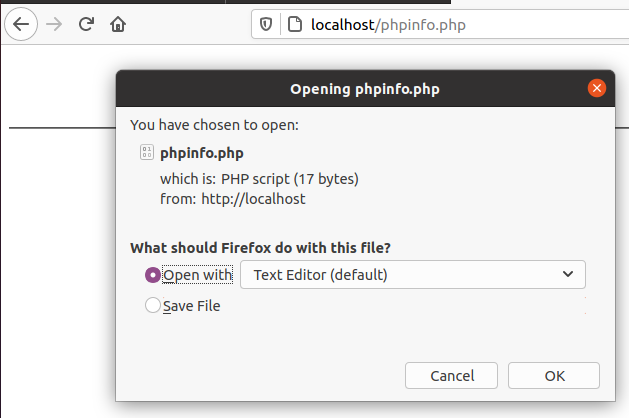

This is nonsense - I want the server to execute the php scripts, not to download it.

So, quickly went to /etc/nginx/sites-available/default and uncommented this block:

# pass PHP scripts to FastCGI server
        #
        location ~ \.php$ {
                include snippets/fastcgi-php.conf;

                # With php-fpm (or other unix sockets):
                fastcgi_pass unix:/var/run/php/php7.4-fpm.sock;
                # With php-cgi (or other tcp sockets):
                fastcgi_pass 127.0.0.1:9000;
        }

Please note that I tested this solution with Ubuntu 20 while this blog is about Debian 10. You may have to replace /var/run/php/php7.4-fpm.sock by /var/run/php7.3-fpm.sock. To find out, do an

ls /var/run/php/php7.*

Then install the server-side php code that is needed by this block:

apt-get install php-fpm

Then nginx did not start any longer:

root@ubuntu:/etc/nginx# service nginx restart

Job for nginx.service failed because the control process exited with error code.

See "systemctl status nginx.service" and "journalctl -xe" for details.

Let's find out why:

root@ubuntu:/etc/nginx# systemctl status nginx.service

● nginx.service - A high performance web server and a reverse proxy server

     Loaded: loaded (/lib/systemd/system/nginx.service; enabled; vendor preset: enabled)

     Active: failed (Result: exit-code) since Sun 2020-12-27 07:16:03 PST; 9s ago

       Docs: man:nginx(8)

    Process: 12741 ExecStartPre=/usr/sbin/nginx -t -q -g daemon on; master_process on; (code=exited, status=1/FAILURE)


Dec 27 07:16:03 ubuntu systemd[1]: Starting A high performance web server and a reverse proxy server...

Dec 27 07:16:03 ubuntu nginx[12741]: nginx: [emerg] "fastcgi_pass" directive is duplicate in /etc/nginx/sites-enabled/default:62

Dec 27 07:16:03 ubuntu nginx[12741]: nginx: configuration file /etc/nginx/nginx.conf test failed

Dec 27 07:16:03 ubuntu systemd[1]: nginx.service: Control process exited, code=exited, status=1/FAILURE

Dec 27 07:16:03 ubuntu systemd[1]: nginx.service: Failed with result 'exit-code'.

Dec 27 07:16:03 ubuntu systemd[1]: Failed to start A high performance web server and a reverse proxy server.

Looking into this, I find out that /etc/nginx/sites-enabled/default is a symbolic link to /etc/nginx/sites-available/default and both files are sourced, so it is no wonder that the fastcgi_pass directive is duplicate. So I delete the link:

root@ubuntu:/etc/nginx/sites-enabled# rm default

Now nginx starts again, but does not open port 80
copied default, removed line 62, and it worked.

Now I copy mediawiki software to /var/www/html/wiki and point the browser to localhost/wiki/index.php. It tells me it needs the php extensions mbstring and xml.

apt-get install php-mbstring

apt-get install php7.4-xml

Now mediawiki tells me it is ready for installation


Issue: MariaDB

This was my first contact with MariaDB. I was surprised how similar it is to mySQL. However, it drove me mad to understand how to log in: You have to call it with -p, but not give the password in the command line. Here as an example how you show the databases:
root@instance-2:/var/www/html/mediawiki/extensions/adaptivethumb# mysql -u admin -pEnter password: Welcome to the MariaDB monitor. Commands end with ; or \g.Your MariaDB connection id is 5742Server version: 10.3.27-MariaDB-0+deb10u1 Debian 10Copyright (c) 2000, 2018, Oracle, MariaDB Corporation Ab and others.Type 'help;' or '\h' for help. Type '\c' to clear the current input statement.MariaDB [(none)]> show databases -> ;+--------------------+| Database |+--------------------+| information_schema || mediawiki || my_wiki || mysql || performance_schema |+--------------------+5 rows in set (0.001 sec)

Next issue: copy the data

To copy the articles I decided for the scripts in mediawiki's maintenance folder. You call them on the command line:

root@oldlinuxintro:/var/www/linuxintro.org/maintenance# php dumpBackup.php --full >/tmp/fullbackup.xml


Copied them using scp


And you restore them with the command


root@newlinuxintro:/var/www/html/mediawiki/maintenance# php importDump.php /root/fullbackup.xml


That's 29MB of data, pure text!!! The pictures are still missing.


Next issue: /wiki path

Now, when I go to http://35.238.169.171/mediawiki, the browser gets redirected to http://35.238.169.171/index.php?title=Main_Page and you can see this in the address bar. In the file system, mediawiki's software is in /var/www/html/mediawiki 

So I added to LocalSettings.php:

$wgArticlePath = '/wiki/$1';  # Virtual path. This directory MUST be different from the one used in $wgScriptPath

$wgUsePathInfo = true;

and it worked:


Next issue: https

https still is not enabled, just http. Obviously the data to be transmitted is not secret, I do not even provide a login section. I found out my web server is nginx, not apache:

root@instance-2:/var/www/html/mediawiki# service apache2 status apache2.service - The Apache HTTP Server Loaded: loaded (/lib/systemd/system/apache2.service; enabled; vendor preset: enabled) Active: failed (Result: exit-code) since Sat 2020-12-26 09:11:46 UTC; 7h ago Docs: https://httpd.apache.org/docs/2.4/ Process: 6807 ExecStart=/usr/sbin/apachectl start (code=exited, status=1/FAILURE)Dec 26 09:11:46 instance-2 systemd[1]: Starting The Apache HTTP Server...Dec 26 09:11:46 instance-2 apachectl[6807]: (98)Address already in use: AH00072: make_sock: could not bind to address [::]:80Dec 26 09:11:46 instance-2 apachectl[6807]: (98)Address already in use: AH00072: make_sock: could not bind to address 0.0.0.0:80Dec 26 09:11:46 instance-2 apachectl[6807]: no listening sockets available, shutting downDec 26 09:11:46 instance-2 apachectl[6807]: AH00015: Unable to open logsDec 26 09:11:46 instance-2 apachectl[6807]: Action 'start' failed.Dec 26 09:11:46 instance-2 apachectl[6807]: The Apache error log may have more information.Dec 26 09:11:46 instance-2 systemd[1]: apache2.service: Control process exited, code=exited, status=1/FAILUREDec 26 09:11:46 instance-2 systemd[1]: apache2.service: Failed with result 'exit-code'.Dec 26 09:11:46 instance-2 systemd[1]: Failed to start The Apache HTTP Server.root@instance-2:/var/www/html/mediawiki# service nginx status nginx.service - A high performance web server and a reverse proxy server Loaded: loaded (/lib/systemd/system/nginx.service; enabled; vendor preset: enabled) Active: active (running) since Sat 2020-12-26 09:52:22 UTC; 6h ago Docs: man:nginx(8) Process: 7141 ExecStartPre=/usr/sbin/nginx -t -q -g daemon on; master_process on; (code=exited, status=0/SUCCESS) Process: 7142 ExecStart=/usr/sbin/nginx -g daemon on; master_process on; (code=exited, status=0/SUCCESS) Main PID: 7143 (nginx) Tasks: 2 (limit: 1967) Memory: 7.2M CGroup: /system.slice/nginx.service ├─7143 nginx: master process /usr/sbin/nginx -g daemon on; master_process on; └─7145 nginx: worker processDec 26 09:52:22 instance-2 systemd[1]: Starting A high performance web server and a reverse proxy server...Dec 26 09:52:22 instance-2 systemd[1]: nginx.service: Failed to parse PID from file /run/nginx.pid: Invalid argumentDec 26 09:52:22 instance-2 systemd[1]: Started A high performance web server and a reverse proxy server.

Never worked with that, so I followed https://willy-tech.de/https-in-nginx-einrichten. It's a German site that describes how to call openssh and how to modify the nginx configuration to work with https.
After editing /etc/nginx/sites-available/mediawiki and restarting nginx, http and https work.

There are now two server blocks, one for http and one for https. I make sure they look identical except for certs stuff.

Next issue: spammers

Mediawiki is by default open, and a popular wiki like Linuxintro easily yields 1000 spam contributions per day. To avoid that, I deny anonymous editing. So I add

$wgGroupPermissions['*'    ]['edit']            = false;

$wgGroupPermissions['*'    ]['createpage']      = false;

$wgGroupPermissions['*'    ]['createtalk']      = false;

$wgGroupPermissions['*']['createaccount'] = false;

to /var/www/html/mediawiki/LocalSettings.php

Next issue: Google Analytics

In the old linuxintro.org, I changed the mediawiki source code so that every html page contains

<script async src="https://www.googletagmanager.com/gtag/js?id=UA-158912120-1"></script>

to register with Google Analytics.

In the new installation, I installed the extension

https://www.mediawiki.org/wiki/Extension:Google_Analytics_Integration

However I did not understand why $wgGoogleAnalyticsOtherCode would be non-optional.

Next issue: DNS

Changed DNS from the old linuxintro.org to the new one :) 11:11 on 2020-12-26.

IP address used to be 50.30.38.138, now is 35.238.169.171

Next issue: URL rewrite

Now, when I surf to http://www.linuxintro.org/... in the browser, the browser URL line gets rewritten to be http://35.238.169.171/.... This is strange, never seen this before. But a look into LocalSettings.php helped. Setting

$wgServer= "http://linuxintro.org"

resolved the thing.

Next issue: stumbleupon button

I realized that I had a button encouraging users to share their experience with linuxintro.org on stumbleupon, that's why the web page now says 
<stumbleuponbutton />
Looking into it, there is a mediawiki extension on https://www.mediawiki.org/wiki/Extension:StumbleUponButton 
But it seems stumbleupon is now called mix and the buttons do not seem to work any longer.

Next issue: My users

It has been very quiet around linuxintro.org, almost no contributions. My favorite would be that everyone can authenticate towards the wiki via an identity provider and then just start contributing. But I don't want to take over user. Whoever wants to contribute to linuxintro.org, please leave a comment here.

Next issue: comments

When I started with Linuxintro.org, I was very happy to be able to provide a service to the world. This service included content and infrastructure. By infrastructure I mean that I run the mediawiki software and much more. The longer it goes, the more I understand that it is a good idea to concentrate on the content and leave the platform to a provider. A good example are comments. When I started with linuxintro, there was quasi nothing but facebook, so I enabled facebook comments which (a) was not used very widely, (b) adds traffic costs (c) increases site load times and is (d) complex to maintain, so I am abandoning facebook comment. In the long run it may be a good idea to move to a managed environment where I can just publish content like blogspot.com.

Next issue: favicon

The favicon is that little thing on the browser tag's top left that tells you about the site you are calling. For the old linuxintro.org, it looks like this:

For the new one, it is still the default:


To resolve this, I just copied favicon.ico from the old web-server-root-directory to the new one. It's now in /var/www/html/mediawiki. And this is what is defined as "root" in /etc/nginx/sites-available/mediawiki.

Next issue: Cannot log in

Now, trying to log in as ThorstenStaerk (my admin user) does not work. I got the error message
There seems to be a problem with your login session; this action has been canceled as a precaution against session hijacking. Go back to the previous page, reload that page and then try again.
Going back did not work. But once I fixed $wgServer not to point to the IP address any longer, but to http://linuxintro.org and I added 

$wgSessionType=CACHE_DB

it worked. I removed the $wgSessionType again.

Next issue: Cannot upload images

I could not upload pictures. To allow it, I set in LocalSettings.php:

$wgEnableUploads = true;

Then it worked.

Next issue: MetaDesc

If you want to tell a search engine what a page is about, you have the chance to do so via a metadesc tag. For this, in mediawiki, they have an extension that can be used starting from mediawiki 1.25. I could not use it before, so I modified the mediawiki source code to recognize metadesc tags. This is now history.

So I installed https://www.mediawiki.org/wiki/Extension:MetaDescriptionTag.

Now let's go to http://linuxintro.org/wiki/set_up_a_webcam and look at the source code. It does contain a meta desc:


And, as supposed, you do not see any of this on the wiki page. But you do see it once you right-click onto the wiki page and select "View page source":


So search engines will know that this page is about webcams ;)

Next issue: The pic tag

To allow images to be resized based on browser size changes, I installed https://www.mediawiki.org/wiki/Extension:AdaptiveThumb

Next issue: regex

I copied regex builder, my page to translate english sentences into a regular expression from the old linuxintro. I copied it to /var/www/html/mediawiki/regex, but nginx now shows "403 forbidden" when I try to access it. In /var/log/nginx/error.log I find a line

2021/01/03 09:36:58 [error] 22918#22918: *50 access forbidden by rule, client: 193.159.30.53, server: linuxintro.org, request: "GET /regex/ HTTP/1.1", host: "linuxintro.org"

It worked once I put into sites-available, on the server for port 80:

location /regex

{

  try_files $uri/index.html $uri =404;

}

Next issue: The images

collected all images on the old VM:

in the images directory, did:

cp $(find -iname "*" ) /tmp/images/

Now

/var/www/html/mediawiki$ php maintenance/importImages.php /tmp/images/

Importing Files


Importing hddj36d9hsz20fjaw6q9hv2mf46uc3i.jpg...LocalFileLockError from line 2228 of /var/www/html/mediawiki/includes/filerepo/file/LocalFile.php: Could not open lock file for "mwstore&#58;//local-backend/local-public/0/0c/Hddj36d9hsz20fjaw6q9hv2mf46uc3i.jpg". Make sure your upload directory is configured correctly and your web server has permission to write to that directory. See https://www.mediawiki.org/wiki/Special:MyLanguage/Manual:$wgUploadDirectory for more information.

Ok, changed to root and changed the directories' ownership:

root@instance-2:/var/www/html/mediawiki# chown -R www-data:www-data images/

now it works:

root@instance-2:/var/www/html/mediawiki# php maintenance/importImages.php /tmp/images/

Importing Files


Importing hddj36d9hsz20fjaw6q9hv2mf46uc3i.jpg...done.

Importing 200px-Mindmap.png...done.

Dienstag, 3. Dezember 2013

how to strace a process

strace is a Linux command that can help you with error analysis. By default it will output every syscall a process does. This means

  • it will output a lot of lines that you will have to examine
  • in the worst case your problem will not even show up. Consider an endless loop like while (true); - this one does not do any syscalls at all.
There is no tool that "drills down" deeper on this analysis than strace. By this it is comparable to
  • disassembling a program as I give an example here. A program, as a contrast to a process, is something stored on disk rather than running in RAM. Disassembling will reveal problems like the above endless loop, but it does not work on a running process. 
  • network sniffing like I give an example here. There is no drill-down to looking at the bytes that are transmitted via a network cable
  • sniffing the SCSI bus with blktrace like I give an example here
  • sniffing the USB bus with wireshark like I give an example here
  • testing IMAP via telnet - going down to the very elements defined in the IMAP protocol
It takes some time till you can use strace for an actual purpose. I started with Linux in 2000 and the first time strace helped me to accomplish a task was in 2013. Here is what happened:

I was setting up guacaMole, the tool to control a Linux desktop from a browser. It basically consists of a daemon, guacd that (if I understood it right) accepts data from the browser and uses it to control a VNC session. It gave me the error message "Server error" which does not really mean anything. So I strace'd it:
# ps -A|grep guac
 7361 ?        00:00:00 guacd
# strace -p 7361
for every login I did on the web interface I saw this in strace's output:
accept(4, {sa_family=AF_INET, sin_port=htons(42845), ...
clone(child_stack=0, ...
close(5)                                = 0
listen(4, 5)                            = 0
now the commands "man 2 accept", "man 2 clone", "man 2 close" and "man 2 listen" told me more. "Clone" means that a separate process will be spawned off. We want strace to follow this process as well so we call it again with the ff parameter:
# strace -ffp 7361
This time there was more output. There were several lines like
[pid 20344] open("/usr/lib/x86_64-linux-gnu/libguac-client-vnc.so", O_RDONLY) = -1 ENOENT (No such file or directory)
reading the complete output, this libguac-client-vnc.so was never found. This told me I had to re-compile the guacamole server with VNC development libraries so its VNC module would be buildable. When I did this, I also had to move the library to the right place (make install did not do), but these are the little hurdles described in my guacaMole tutorial.

You can do much more with strace. If I had known this was all about a missing file I would have started it with -e open. This tells strace to only print occurences of the syscall open. In effect it allows you to monitor which files are accessed by a process. I use it to find out where configuration changes are stored (ok, maybe this was not the first time strace was useful to me).

You do not need to know a process ID to call strace. You can just call 
strace program
and strace will load program as a process and output its syscalls.

strace shortens information for you and replaces strings by "..." before they get too long. To change this use the -s parameter to determine how long strings are supposed to be. For more information see the man page.

strace can also be used a bit more abstract for performance analysis.
strace -c ls -R
will show you in which syscalls the ls program passed most of its time. This is helpful if you want to optimize routines for speed. The output could look like this:
Entries  Repository  Root
% time     seconds  usecs/call     calls    errors syscall
------ ----------- ----------- --------- --------- ----------------
 67.09    0.412153          14     29664           getdents64
 27.70    0.170168          11     14849        14 open
  4.24    0.026043           0    123740           write
  0.72    0.004443           0     14837           close
  0.20    0.001204           0     14836           fstat
  0.05    0.000285         285         1           execve
  0.00    0.000000           0        12           read
  0.00    0.000000           0         4         3 stat
  0.00    0.000000           0        33           mmap
  0.00    0.000000           0        18           mprotect
  0.00    0.000000           0         4           munmap
  0.00    0.000000           0        12           brk
  0.00    0.000000           0         2           rt_sigaction
  0.00    0.000000           0         1           rt_sigprocmask
  0.00    0.000000           0         2           ioctl
  0.00    0.000000           0         1         1 access
  0.00    0.000000           0         3           mremap
  0.00    0.000000           0         1           fcntl
  0.00    0.000000           0         1           getrlimit
  0.00    0.000000           0         1           statfs
  0.00    0.000000           0         1           arch_prctl
  0.00    0.000000           0         3         1 futex
  0.00    0.000000           0         1           set_tid_address
  0.00    0.000000           0         8           fadvise64
  0.00    0.000000           0         1           set_robust_list
------ ----------- ----------- --------- --------- ----------------
100.00    0.614296                198036        19 total
which means that more than two thirds of ls' time was passed in the getdents64 syscall. I'll leave you alone for now if you want to man 2 getdents64 and start optimizing the ls program to list directories. Have fun!

Raspberry Pi, test my internet connection

Since start of Corona times, I use my internet at home also for work. So its reliability and performance has become crucial. Performance see...